




You reschedule a certification exam in the account of whoever holds your booking, and you do it before that provider’s cut-off. For many exams booked through Pearson VUE the cut-off is 24 hours, but it ranges from 24 hours to ten business days depending on the provider and the way you sit the exam. Your voucher’s expiry date is a separate limit, and a successful reschedule does not extend it. Work out those three things first (who holds the booking, the cut-off, the voucher expiry) and the change takes a few minutes.
This guide gives you the routine, shows real provider deadlines side by side, and explains what happens to your fee and voucher when you move or cancel.
Table of Contents
- The routine in five steps
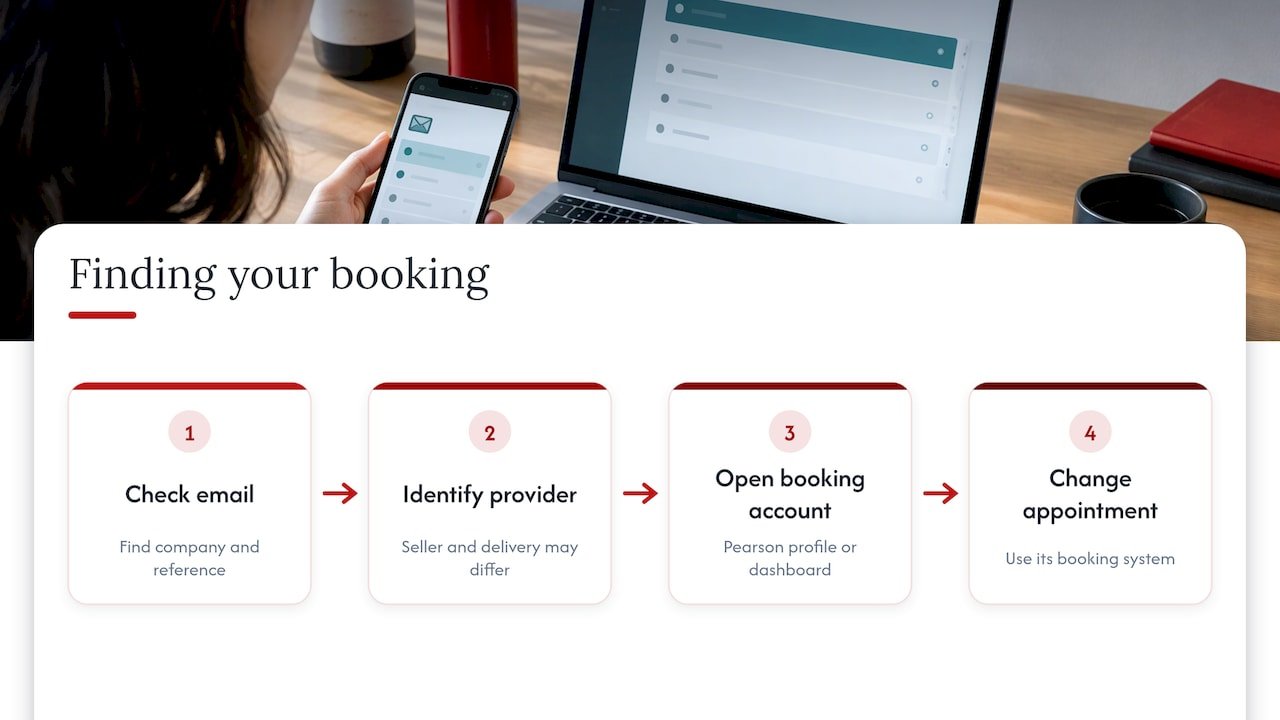
- Step 1: Find out who holds your booking
- Step 2: Check the deadline before anything else
- Step 3: Make the change in your account
- Step 4: Confirm the change worked
- What happens to your fee and voucher
- Your voucher expiry is a separate clock
- If the reschedule option is missing
- Keep your new date visible
- Rescheduling a GetVoucher exam
- Choosing a certification you can plan around
- FAQ
- Sources
The routine in five steps
- Identify who holds your booking. It may be the certification body, an exam-delivery platform or a proctoring service.
- Read that provider’s change policy. Note the notice period, any fee and whether it differs for online and test-centre exams.
- Check your voucher’s expiry date. The new slot must fall before it.
- Make the change in your account, not by email, unless the provider says otherwise.
- Confirm it. A completed change should appear in your profile and arrive by email.
Each step is explained below, including where candidates most often lose money.
Step 1: Find out who holds your booking
The most common mistake is looking in the wrong place. A certification body often sells the exam, while a separate company delivers it. Pearson VUE, for example, delivers exams for many programmes, and its own FAQ says that rescheduling deadlines and fees vary by testing program.
That split changes where you click. The Linux Professional Institute states that its own staff cannot move a Pearson VUE appointment: candidates must use their Pearson profile or Pearson customer service. ISC2 sends you from its own portal to Pearson’s dashboard to complete the change, as its scheduling guide explains.
Your confirmation email is the quickest clue. It names the delivery company and shows the appointment reference. If you bought a voucher from a reseller, the voucher usually gets redeemed in the provider’s system, and the booking then lives there. Our guide to scheduling a Scrum exam provider by provider explains how booking, account activation and voucher redemption differ, which helps you work out where your change must be made.
Step 2: Check the deadline before anything else
Notice periods are the rule that costs people most. They are short for many exams but not for all, and the same provider can set different limits for online and in-person sittings. The table shows a sample of published policies. Each row is the provider’s own rule for its own exams, so treat it as an illustration of how much they vary, not as a rule you can carry from one certification to another.
| Provider | Notice needed | What a late change means |
|---|---|---|
| Salesforce | At least 48 hours for onsite exams, 24 hours for online exams | A no-show without contacting Salesforce Help before the exam starts is charged the full fee, and a voucher is forfeited |
| CompTIA | At least 24 hours for in-person exams; before the scheduled start for OnVUE exams | The exam fee is forfeited and payment is required to reschedule |
| HashiCorp | More than 24 hours | Emergencies go through a support ticket with documentation, with no promise the fee is covered |
| ISC2 | Not within 24 hours of the appointment | A US$50 rescheduling fee and a US$100 cancellation fee are listed |
| Google Cloud | Change at least 24 hours before start | A late-change fee applies |
| Okta (via Examity) | Up to 24 hours before start without penalty | A late change carries a fee |
| Credentia | 48 hours for online exams, ten business days for test-centre exams | Fee not refunded or transferred after a missed deadline and no-show |
| LPI | At least two business days, during business hours, for a full refund | Insufficient notice or a no-show makes the fee nonrefundable |
| FINRA (United States) | At least 10 business days to avoid fees | A change within 3 to 10 business days incurs a fee; within two business days or a no-show can cost a fee equal to the exam cost |
Three habits follow from the table.
Count in the provider’s time, not yours. Cut-offs run from the appointment start, so a 9 a.m. exam with a 24-hour rule closes at 9 a.m. the day before. If you sit an exam in a different time zone from the one shown in your account, check which one the portal uses.
Business days are not calendar days. A ten-business-day rule skips weekends and, depending on the provider, public holidays, so it can stretch to two full weeks.
Look for a maximum window as well as a minimum notice. HashiCorp, for instance, says appointments cannot be moved beyond 60 days from the original purchase date. A generous cut-off does not help if the new slot falls outside the allowed window.
Step 3: Make the change in your account
The click path differs by provider, but most follow the same pattern: sign in, find the upcoming appointment, choose Reschedule, pick a new slot and confirm. Examples from official pages:
- Pearson VUE: select the exam under Upcoming Appointments and follow the on-screen instructions, as the Pearson VUE FAQ describes.
- Salesforce: open Trailhead Academy, find the exam under My Dashboard and My Certifications, choose Modify Registration, continue to Pearson VUE and select Reschedule, according to Salesforce Help.
- CompTIA: sign in to your CompTIA account, open My Exams, then use Upcoming Appointments in Pearson VUE to select Reschedule and confirm the new slot, per CompTIA’s support page.
- ISC2: sign in, open Courses and Exams, select Reschedule, review your account details, then finish in Pearson’s dashboard, as the ISC2 guide sets out.
- Google Cloud: log in to CM Connect and use Reschedule or Cancel beside the exam in Upcoming Appointments, as the Google Cloud help page says.
When you pick the new slot, choose it with the voucher expiry in mind and leave a buffer. If you sit the exam online, check your equipment before you commit to a date: our remote exam requirements guide covers equipment, internet, ID and room rules, and a failed system check on exam day can cost you the slot you just moved.
Step 4: Confirm the change worked
Do not assume the new time is locked in when the page closes. Pearson VUE says a completed change should show in your candidate profile and be confirmed by email. If the updated appointment is not reflected online, contact customer service to confirm it.
A quick check list:
- The old appointment no longer appears under Upcoming Appointments.
- The new date, time and time zone match what you chose.
- You received a confirmation email, and you have kept it.
- Any voucher or promotional code is still attached to the booking.
What happens to your fee and voucher
On timely changes, most providers move your payment to the new slot at no cost. Salesforce allows changes made inside its notice windows free of charge, and Credentia says timely changes transfer the fee without penalty. Rescheduling and cancelling are not the same thing, though, and the consequences differ.
Cancelling a voucher-paid exam. HashiCorp says a timely cancellation restores the voucher value, original expiry and restrictions. CompTIA says a reinstated voucher can be reused only before its expiration.
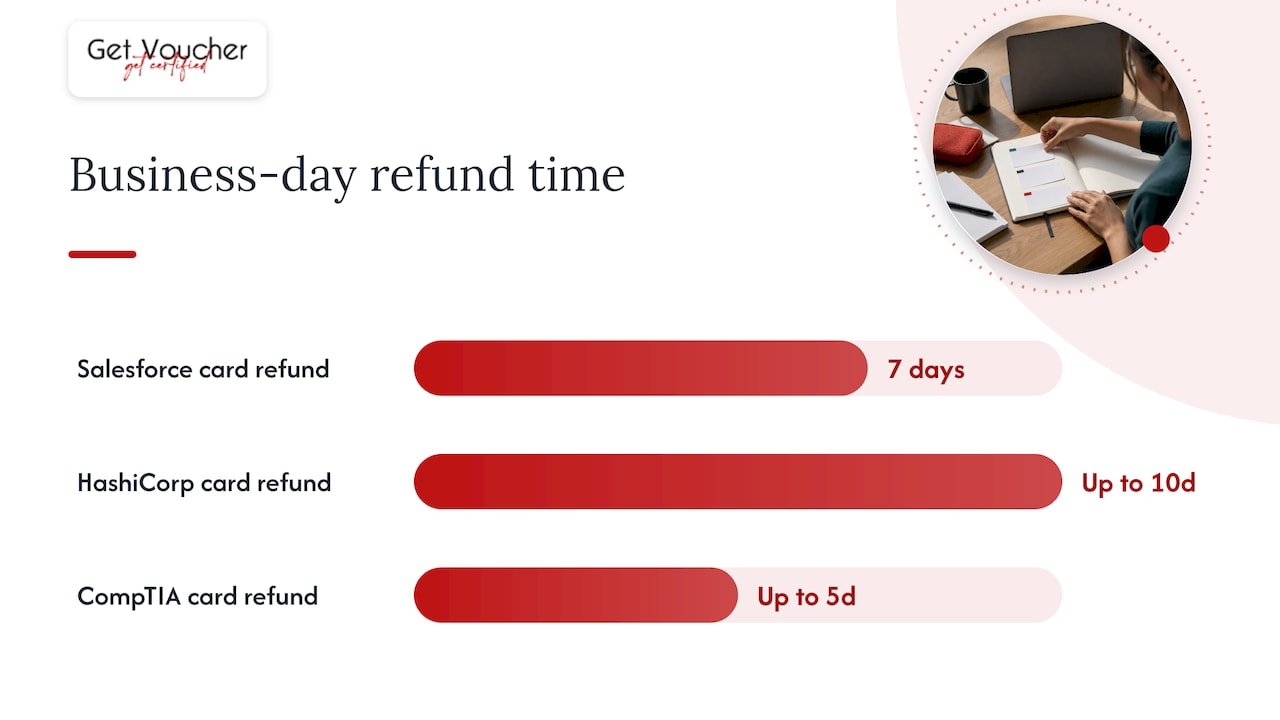
Cancelling a card-paid exam. Refund times differ: Salesforce quotes seven business days for credit-card refunds, HashiCorp up to 10, and CompTIA up to five, each in the pages linked above.
Promotional codes. Okta warns that a code used to book an exam cannot be reused once the appointment is cancelled. If you hold a discount code rather than a paid voucher, reschedule rather than cancel.
Repeated no-shows. Credentia says that after two no-shows your application to test is removed and you must reapply, as its guide states.
The lesson is that the word on the button matters. Choose Reschedule when you still want the exam, and treat Cancel as a separate decision with its own refund rules.
Your voucher expiry is a separate clock
Rescheduling moves your appointment. It does not move the date by which the voucher must be used. CompTIA’s guidance makes the point directly: a reinstated voucher must still be used before its own expiry. LPI goes further and says voucher expiry dates cannot be extended. ISC2 adds a purchase-based limit, saying the exam must be scheduled and sat within 365 days of purchase or the fee is not refunded.
Two deadlines can therefore apply at once:
- A redemption deadline: the date by which you must activate or book with the voucher.
- An exam-completion deadline: the date by which you must have sat the exam.
They are not always the same date, and providers set them individually. Read your voucher terms for both before you move a booking late in its life. Our guides on how long exam vouchers last and what an exam voucher covers explain the difference between these terms, and the refund policy sets out what applies to purchases from us.
If the reschedule option is missing
Sometimes the button is greyed out or the appointment is not listed. The usual causes are:
- You are inside the cut-off. Most systems remove the option once the notice period has passed. If you have a real emergency, contact the provider’s support with documentation. HashiCorp, for example, accepts a support ticket for emergencies, though it cannot promise the fee will be covered.
- You are in the wrong account. Exam bodies and delivery platforms keep separate profiles. Try the one named in your confirmation email.
- The booking has not synced. If the change is not showing, Pearson VUE advises contacting its customer service to confirm it.
- The booking was made by someone else. Employer-bought exams may be controlled by the person who made the purchase.
Once you contact support, give the appointment reference, the exam name, your original and requested dates, and your voucher code if you have one. Keep a copy of every reply.
Keep your new date visible
A rescheduled exam is easy to forget in the wrong calendar, especially when you moved it twice. Add the new time to your phone calendar straight away, with a reminder for the cut-off of any further change. If you juggle several deadlines, a tool that can sync exam dates to Google Calendar keeps them in one place and helps you spot clashes before they cost you a fee.
Rescheduling a GetVoucher exam
GetVoucher is a certification voucher platform, and we work with providers such as VMEdu and certification bodies including SCRUMstudy, SMstudy, 6sigmastudy and NGstudy. That is a commercial relationship, and we state it so you know where our guidance comes from.
Rules differ by product, so treat each voucher individually. What a purchase includes, how the exam is delivered, and whether scheduling is involved all depend on the certification. For example, the SCRUMstudy SMC® uses a 100-question, 120-minute online unproctored exam, and the SCRUMstudy Scrum Fundamentals Certified exam is a 40-question, 60-minute online unproctored exam. Proctored and unproctored formats are not ranked by credibility, and neither tells you how a different provider handles changes. Always read the terms for the specific certification before you rely on a deadline.
Our view on rescheduling
We think of a rescheduled exam as a planning problem rather than a failure. Candidates who work full time, change career or study alongside a job will sometimes need to move a date, and the cost of that should be a few clicks, not a lost fee.
That is why we publish guidance on voucher expiry, retake terms and scheduling as separate pages: booking, redemption and exam access are different steps, and mixing them up is how deadlines get missed. We build our catalogue around flexible online learning, so you can choose a certification and prepare at a pace that fits your working life.
Our advice is to read the terms for your own voucher before booking, set the date with a buffer before expiry, and note the cut-off for changes the day you book.
Rayan
Choosing a certification you can plan around
If you are still choosing, our catalogue starts with free introductory options, Scrum Fundamentals Certified and Six Sigma Yellow Belt (SSYB™), both at £0, and moves up to paid certifications such as Scrum Master Certified (SMC®) at £249 and SMstudy® Certified Digital Marketing Professional at £199. Prices are one-off and published on our certifications page and the GetVoucher homepage.
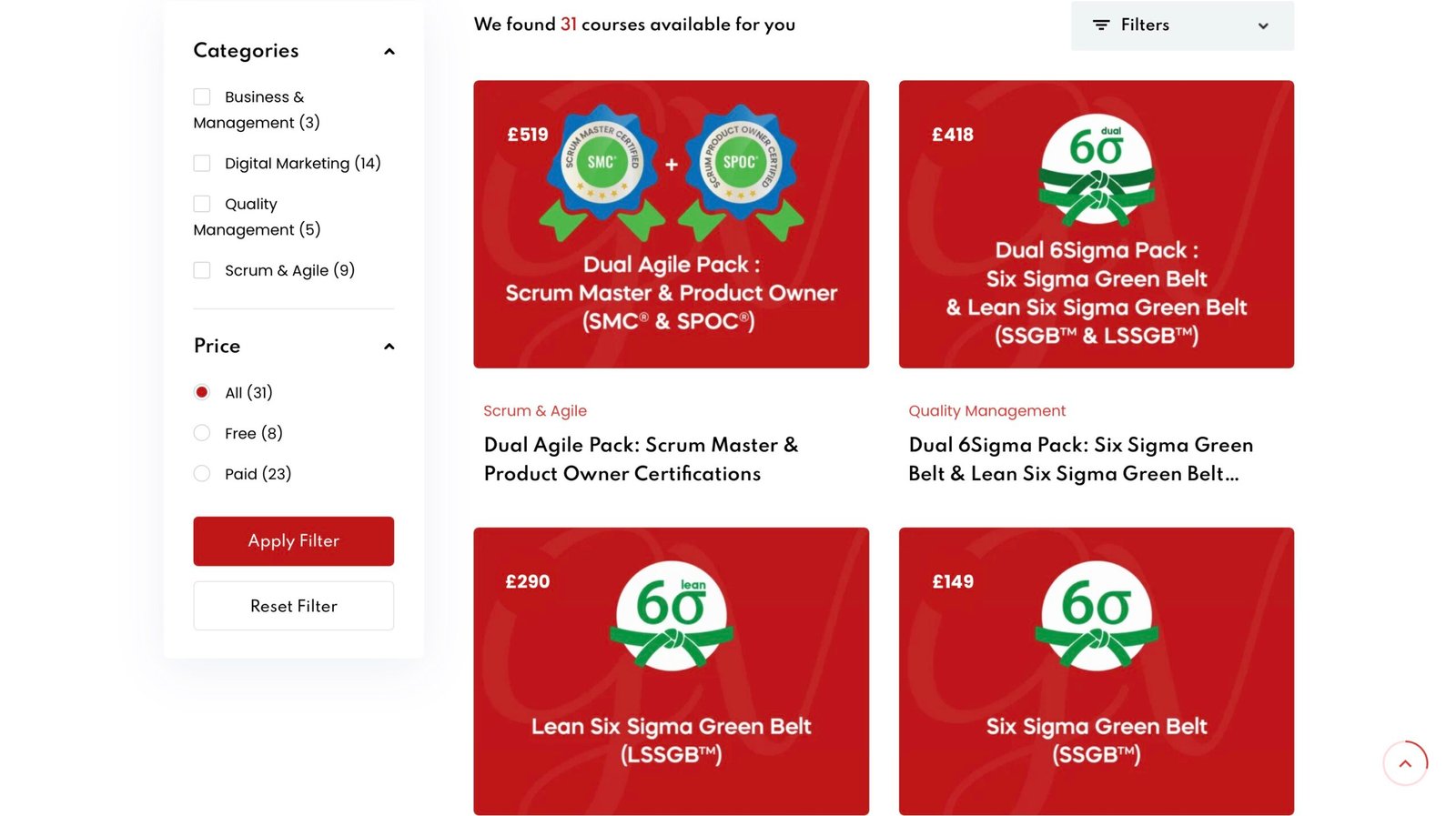
If you are ready to plan a date, browse the full catalogue and match each certification to your experience and goals.
FAQ
How long before my exam can I reschedule?
It depends on the provider and on whether you sit the exam online or at a test centre. Published rules range from 24 hours (CompTIA in-person exams, Google Cloud, HashiCorp) to 48 hours for Salesforce onsite exams and ten business days for Credentia test-centre exams. Check the policy for your own exam, because Pearson VUE itself says deadlines vary by programme.
Will I lose my voucher if I reschedule?
Not if you change the booking inside the provider’s notice window. Providers such as CompTIA and HashiCorp reinstate a voucher after a timely cancellation, with the original expiry date. A late change or a no-show can forfeit it, and Salesforce says a voucher is forfeited if you do not show up and have not contacted its support before the start.
Does rescheduling extend my voucher’s expiry date?
No. The expiry is a separate limit, and a new appointment must fall before it. LPI states that its voucher expiry dates cannot be extended, so choose your new slot with a buffer.
What if the appointment does not appear after I reschedule?
Wait for the confirmation email, then check your candidate profile. If the updated booking is still not visible, Pearson VUE advises contacting its customer service to confirm it. Quote your appointment reference and keep the email trail.
Can I reschedule if I am already inside the cut-off?
Usually the self-service option disappears. For a genuine emergency, contact the provider’s support with documentation. HashiCorp accepts support tickets in this case, but says it cannot guarantee the fee will be covered.
Sources
- FAQs for test takers, Pearson VUE
- Salesforce Certification Exam Reschedule and Cancellation Policy
- How to Reschedule Your Salesforce Certification Exam
- How Do I Reschedule My Exam? CompTIA
- How do I reschedule or cancel my appointment? HashiCorp
- ISC2 Exam Registration and Scheduling Guide
- Rescheduling or canceling a scheduled exam, Google Cloud
- Examity User Guide for Okta Certification Exams
- Reschedule, Credentia Self-Help Guides
- Linux Professional Institute Exam Vouchers and Return Policy
- Reschedule or Cancel Your Appointment, FINRA
- Sync Your Exam Schedule to Google Calendar