




An online proctored exam is a timed test that a human or software monitors remotely through your webcam, microphone, and screen. The bottom line: you will be watched, recorded, or both, and the fastest way to pass without drama is to follow your sponsor’s setup rules to the letter before you click “start.”
Providers such as Questionmark and Pearson VUE use various forms of online proctoring, but exam delivery methods vary by certification provider. Some certification bodies instead use unproctored online exams. So do certification giants like ETS and testing centers that use Prometric software. The setup varies by vendor, but the core mechanics don’t. Expect one or more of these to be recorded during your session:
- Live webcam video showing your face and surroundings
- Screen activity, including every application and browser tab you open
- Microphone audio for the full session
- Keystroke and navigation logs tied to a timestamp
None of this should be a surprise on test day. Sponsors disclose it upfront, and understanding it now means you walk in prepared instead of anxious.
Key Takeaways
Passing an online proctored exam depends far more on pre-exam system checks and following room-scan rules than on any content knowledge gap.
| Point | Details |
|---|---|
| Know your proctoring model | Live, recorded, automated, and blended models trade off real-time intervention against scheduling flexibility and cost. |
| Run the system check early | Test your webcam, mic, and secure browser on the exact device and location you’ll use on exam day. |
| Understand what’s recorded | Screen activity, webcam video, and audio are typically retained as an audit trail if a violation gets flagged. |
| Flags aren’t verdicts | Blended AI-plus-human review models exist specifically to catch false positives before they affect your result. |
| GetVoucher supports readiness |
GetVoucher provides certification vouchers and study materials to help you prepare. Exam formats vary by provider, with both proctored and unproctored exams available. |
Vendor Documentation Worth Bookmarking
Before your exam, check your sponsor’s specific rules first, since requirements vary by provider and certification. These vendor resources are useful starting points:
- Questionmark’s proctoring platform page for understanding recorded data types and retention practices
- Pearson VUE’s OnVUE guidance for test-takers for system check tools and live-proctoring specifics
- Research for a plain-language walkthrough of the full process
Always confirm exact rules with your specific exam sponsor. Requirements shift by provider, certification body, and sometimes by country, so vendor-level documentation should be your final word over any general guide, including this one.
Table of Contents
- What Is Online Proctoring and Why Does It Exist?
- How Online Exams Work, Step by Step
- What Gets Recorded and How Your Data Is Handled
- System Requirements and How to Avoid Common Failures
- How to Get Ready on Test Day
- How Flags, Reviews, and Appeals Actually Work
- Weighing the Real Trade-Offs of Remote Proctoring
- Why This Guide Reflects How Proctoring Actually Works
- Why the Conventional Advice Falls Short
- Get Exam-Ready with GetVoucher’s Certification Vouchers
- Sources
What Is Online Proctoring and Why Does It Exist?
Online proctoring exists to solve one problem: how do you trust a test result when nobody from the testing organization is physically in the room? The answer institutions landed on is remote supervision, either by a live human, a recording reviewed later, software that flags anomalies, or some mix of the three.
Three groups drive most of the demand for this. Universities use it to preserve academic integrity in distance courses. Certification bodies, think project management, IT, or agile credentialing programs, use it because the certificate only carries weight if employers trust the process behind it. Employers use it for pre-hire skills assessments where a candidate’s real ability matters more than their friend’s.
The purpose boils down to three things: confirming you are who you say you are, controlling what happens in your physical environment during the test, and creating a record that can be reviewed if something looks off later. That third piece matters more than most test-takers realize. Research that proctoring creates a defensible audit trail, which protects honest test-takers just as much as it catches dishonest ones. If your connection glitches or a reviewer misreads a moment on camera, that recording is what clears your name.
Four proctoring models dominate the market, and each fits a different risk tolerance:
- Live proctoring. A real person watches your session in real time, usually through a video call interface, and can intervene immediately if something looks wrong. Pearson VUE’s OnVUE platform uses this approach for high-stakes certification exams where immediate human judgment matters more than speed of scheduling.
- Recorded, or record-and-review. The session is captured in full and reviewed afterward, either in whole or by flagged segment. Questionmark’s platform leans on this model for many of its enterprise clients, trading real-time intervention for scheduling flexibility.
- Automated, or AI-based. Software monitors your webcam feed, audio, and screen activity, flagging anomalies like a second voice or a face leaving the frame, with no human watching live. It scales cheaply but produces more false positives than a trained human would catch.
Here’s the practical trade-off: live proctoring gives you the most protection against a misfire because a person can clarify a weird noise or odd camera angle on the spot. Automated systems are faster to schedule and often cheaper for the sponsor, but you’re relying on a human reviewer catching the flag later, correctly, and in your favor. Blended models split the difference, and they’re increasingly the default for mid-stakes professional certifications.
Are All Online Certification Exams Proctored?
No. Some certification providers use online proctoring, while others offer unproctored online exams. Exam policies can also change over time. For example, SCRUMstudy, which previously used proctored exams, currently offers unproctored online exams. Always check the latest requirements for your specific certification.
How Online Exams Work, Step by Step
Every proctored exam follows roughly the same checkpoint sequence, whether you’re testing through Pearson VUE, Prometric, ETS, or a smaller platform tied to your certification body. Research confirms that a failure at any one checkpoint, not just the exam itself, can delay or block your results. Knowing the sequence in advance is half the battle.
- Registration and scheduling. You pick a test window, sometimes a fixed appointment, sometimes a flexible 24/7 slot depending on the sponsor. Read the specific rules for your exam here, since permitted materials and time limits vary by certification.
- Pre-exam system check. Most vendors require you to install a secure browser or proctoring client days before your appointment, not the morning of. This locks down your desktop so you can’t tab out to notes or a search engine during the test.
- Identity verification. You’ll photograph a government-issued ID and often take a live selfie for comparison. Some systems also compare your typing pattern or voice against a baseline.
- Environment scan. You’ll be asked to pan your webcam around the room, a 360-degree sweep that usually needs to include your desk surface, the floor under it, and any nearby walls. Prometric’s guidance on this scan is specific: candidates who practice the motion beforehand tend to get through it in under a minute instead of fumbling for three.
- Monitored testing. Once you begin, the system watches continuously. Depending on the model, that means a live proctor observing your feed, software scanning for anomalies, or both. Anything from a second person entering the frame to prolonged silence followed by rapid typing can trigger a flag.
- Submission and automated scoring. For objective, machine-scored formats, you’ll often see a provisional result immediately after submission.
- Human review of flagged incidents. If nothing was flagged, your result usually stands as final within a defined window. If something was flagged, a reviewer examines the recording before your result is confirmed, which can add days to your timeline.
The layered approach, identity check plus secure browser plus active monitoring, is the standard recommended stack for anything high-stakes, according to Questionmark’s own platform documentation. Skipping any one layer weakens the whole system, which is why sponsors rarely let you opt out of even the least intrusive step.
Pro Tip: Screenshot your confirmation email and system-check results the moment you finish them. If a dispute comes up later about whether you completed a required step, having your own timestamped proof saves you a frustrating back-and-forth with support.
What Gets Recorded and How Your Data Is Handled
Proctoring software typically captures four categories of data during your session, and each one exists for a specific reason, not just because the technology allows it.
- Webcam video confirms you’re the person who was ID verified and that no unauthorized person is assisting you.
- Audio picks up spoken answers being fed to you, a second voice in the room, or other sounds inconsistent with a solo, silent test environment.
- Screen activity shows every window, tab, and application open during your session, which catches unauthorized reference material or communication tools.
- Browser and system logs, and occasionally a biometric snapshot like a face-match score, create a timestamped record tied to your specific session.
Questionmark’s proctoring documentation confirms this is standard architecture: continuous behavioral monitoring paired with an identity check upfront, with everything retained as an audit trail in case a violation gets flagged. That retention is the part test-takers underestimate. Your session isn’t just watched once and discarded. It sits in storage, accessible to reviewers, for a defined window that varies by sponsor, sometimes 30 days, sometimes considerably longer for high-stakes professional certifications.
Here’s a detail that should change how you think about data requests: sponsors are expected to define consent flows, data-retention policies, and reviewer training before rolling out a proctored exam program at all, per Questionmark’s own guidance on proctored exams. If your sponsor hasn’t clearly disclosed how long your recording is kept or who can access it, that’s a legitimate question to raise before test day, not after.
A few concrete steps protect you without slowing down your registration:
- Ask your sponsor directly how long recordings are retained and whether they’re encrypted in storage.
- Confirm who has access to your recording, internal reviewers only, or a third-party proctoring vendor as well.
- Read the consent agreement fully before you sign it electronically, especially any clause about data sharing with third parties.
- If you have a documented disability or need an accommodation, ask about it during registration, not the morning of your exam.
None of this is paranoia. It’s the same due diligence you’d apply to any service that records you on camera for an extended period and keeps that footage on a server somewhere.
System Requirements and How to Avoid Common Failures
Most exam-day problems aren’t behavioral flags. They’re technical ones, and nearly all of them are preventable with a test run days before your appointment. Pearson VUE’s OnVUE guidance for test-takers is blunt about this: the single biggest predictor of a smooth exam is running the vendor’s system check on the exact device, in the exact location, that you’ll use on test day.
Here’s what most vendors expect as a baseline:
- A working webcam and microphone with granted (not just installed) permissions
- A hardwired or strong Wi-Fi connection, with most vendors recommending at least 1 Mbps upload and download, though high-stakes exams may ask for more
- An updated operating system, since older versions sometimes fail secure browser installs silently
- Administrative rights on the device to install the required proctoring client or lockdown browser
- A closed-door room free of other people and secondary monitors
Four issues cause the overwhelming majority of test-day technical failures: webcam or microphone permissions that were granted to the browser but not to the specific proctoring app, an active VPN that the secure browser detects and blocks, an outdated operating system that can’t run the lockdown client properly, and bandwidth too thin to sustain continuous video upload for two or three hours straight.
The fix for all four is the same: don’t wait until exam morning to discover them. Run the vendor’s official system check tool at least a day ahead, on the same laptop, in the same room, connected to the same network you’ll use for the real thing. Switching devices or locations between your practice run and your actual exam is one of the most common, and most avoidable, causes of last-minute denial.

Pro Tip: Plug your laptop into power for the full exam window, even if your battery shows 100 percent. A secure browser sometimes throttles or interrupts a session when a device switches to battery-saving mode mid-test, and that interruption can look identical to a suspicious disconnect on the proctor’s end.
A few more moves cut your risk close to zero: use an ethernet cable instead of Wi-Fi if you have the option, disable automatic OS and app updates for the day so nothing installs mid-exam, silence every notification (including calendar reminders and messaging apps), and close every unrelated browser tab before the secure browser even launches.
How to Get Ready on Test Day
Test day success comes down to sequence. Do these in order, roughly 30 to 45 minutes before your scheduled start.
- Set up your room first. Choose a space with a plain, uncluttered background, clear your desk of paper, phones, and secondary devices, and make sure lighting hits your face directly rather than from behind you. A lamp positioned in front of your monitor works better than overhead lighting alone.
- Rehearse the room scan. Most systems ask for a full 360-degree pan, including under your desk. Practice the motion once so you move the camera smoothly instead of jerking it around and triggering a re-scan request.
- Gather your ID and permitted materials. Have your government-issued ID ready, and if scratch paper is allowed, know the exact rules, some sponsors require you to show blank paper to the camera before starting and again before disposing of it afterward.
- Log in early, not exactly on time. Most platforms open a check-in window 15 to 30 minutes before your slot. Logging in right at your start time, with no buffer, is how small glitches turn into missed appointments.
- Know how to reach support instantly. Keep the sponsor’s live chat or phone support number open in a separate tab or on your phone, not buried in an email you’d have to search for during a panic.
- If your connection drops, document it immediately. Note the exact time, take a screenshot of any error message, and contact support the moment you’re back online. That timestamp becomes your evidence if the interruption needs to be explained later.
The room scan trips up more people than any other step, mostly because they rush it. Slow, deliberate camera movement that clearly shows the floor, the desk underside, and all four walls gets approved faster than a fast sweep that has to be repeated.
How Flags, Reviews, and Appeals Actually Work
Most flags aren’t accusations. They’re prompts for a human to take a closer look, and understanding what triggers one takes most of the fear out of the process.
- A second voice or person appearing in frame, even briefly
- A phone detected on the desk or in view
- Excessive tab switching or attempts to open unauthorized applications
- Prolonged silence followed by unusually fast typing
- The candidate’s face leaving the webcam frame for an extended period
When automated software raises a flag, it doesn’t automatically fail you. In blended systems, and Prometric’s ProProctor is built specifically around this model, the AI’s job is to surface the moment, and a trained human reviewer decides what it actually means. That human step exists because software alone struggles to tell the difference between a legitimate distraction, a knock at the door, a pet walking through, and genuine misconduct.
If you’re notified about a flagged incident, the sponsor typically bases its decision on the recorded video, audio, and system logs from that exact window. If you’re appealing, specifics help far more than a general objection: note the precise timestamp, describe what actually happened, and if you have independent evidence (a delivery notification, a household member’s schedule), include it. Review timelines vary by sponsor, but most resolve within one to two weeks of the flagged session.
Blended AI-plus-human models measurably reduce false positives compared to AI-only review, which is exactly why more certification bodies have shifted toward them over pure automation in the past few years.
Weighing the Real Trade-Offs of Remote Proctoring
Online proctoring solves real problems, but it isn’t free of friction, and pretending otherwise does test-takers no favors.
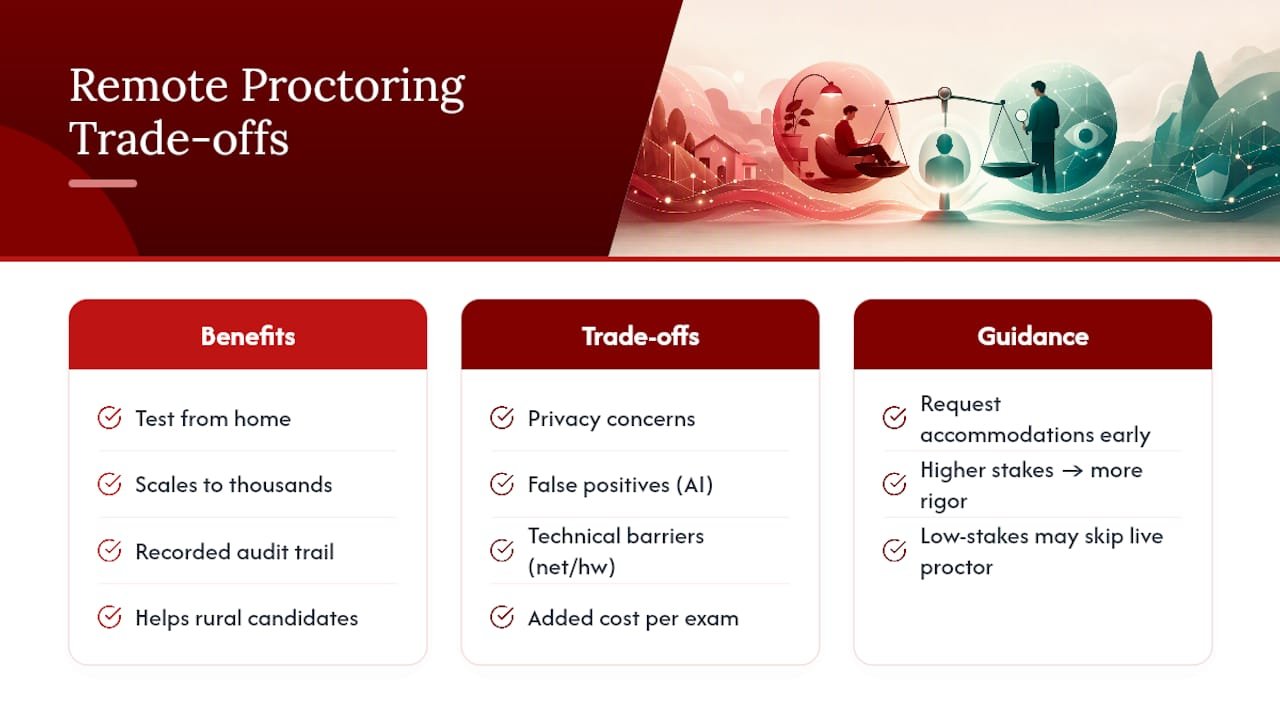
The benefits are concrete. You can test from home or a hotel room instead of driving to a physical center, which matters enormously for rural candidates or anyone without a testing site nearby. Sponsors get to scale exam delivery to thousands of candidates simultaneously. And the recorded audit trail protects test-takers as much as institutions when a dispute arises.
The limitations are just as real. Privacy concerns are legitimate, you’re inviting a recording device into your home. False positives happen, particularly with AI-only systems, and they create real stress even when they resolve in your favor. Technical barriers shut out candidates with unreliable internet or older hardware. And for sponsors, proctoring adds real cost per exam compared to an unmonitored online test.
Accessibility deserves specific attention here. If you have a documented disability, condition, or need extra time, ask your sponsor about accommodations during registration, not the week of your exam. Reasonable accommodations, extended time, modified environment rules, alternative ID verification, are standard practice at legitimate testing organizations, but they need to lead time to arrange.
As a rule of thumb: the higher the stakes of the certification, the more proctoring rigor (and human oversight) makes sense. A low-stakes practice quiz probably doesn’t need live human monitoring. A professional certification that affects your job title and salary probably should have one somewhere in the review chain.
Why This Guide Reflects How Proctoring Actually Works
This guide draws on the same process documentation vendors publish for their own customers, cross-checked against how test-takers actually describe the experience. Every workflow step, recorded data type, and technical requirement mentioned here comes from vendor-level sourcing rather than guesswork about what “probably” happens during a proctored session.
Get-voucher’s role in this picture is straightforward: the platform sells certification vouchers and prep courses across Scrum, Agile, Digital Marketing, and Quality Management, in partnership with course providers like VMEdu, and part of that support means helping learners understand what to expect when they book their proctored exam. That includes:
- Study materials aligned to the actual exam format you’ll face, not generic test-prep content
- A learning management system that lets you track readiness before you schedule your session
- Course selection across multiple certification tracks, so career switchers aren’t stuck with one narrow path
- Guidance on scheduling logistics so the technical side of proctoring doesn’t derail preparation you’ve already put in
Learners who understand the proctoring process ahead of time report far less exam-day anxiety than those who encounter the ID check, room scan, and secure browser install for the first time on test morning. Preparation for the content matters, but preparation for the process matters just as much, and it’s the piece most study guides skip entirely.
Why the Conventional Advice Falls Short
Most guides to online proctored exams treat the technology as the whole story: install this browser, don’t cheat, you’ll be fine. That framing misses where candidates actually lose points or lose time, which is almost always process failure, not dishonesty.
The evidence throughout vendor documentation points to a consistent pattern: system checks skipped, room scans rushed, devices swapped between practice and test day. None of that is misconduct. It’s preventable friction that gets treated the same way a real violation would, at least until a human reviewer sorts it out, and that sorting-out period is stressful and avoidable.
My honest read: candidates spend too much energy worrying about being falsely accused of cheating and not nearly enough energy running the boring system check the day before. The blended model, AI flagging plus human review, is a genuine improvement over pure automation, but it still can’t fix a candidate who never tested their webcam permissions. Prioritize the test run. Everything else follows from there.
— Rayan
Get Exam-Ready with GetVoucher’s Certification Vouchers
Get-voucher gives you a direct path to the certification exams covered in this guide, without the markup of buying through a traditional training provider. You get affordable vouchers for exams in Scrum, Agile, Digital Marketing, and Quality Management, bundled with study materials built for the actual exam format, not generic filler content.

If everything in this guide, the system checks, the room scans, the flag triggers, felt like a lot to absorb, that’s exactly why preparation matters as much as the exam content itself. Get-voucher’s certification vouchers pair access to courses from established providers with a learning management system that tracks your readiness before you ever schedule a proctored session. Whether you’re eyeing a Scrum Master certification or a Digital Marketing credential, the voucher gets you into the course and positions you to book your exam with confidence instead of guesswork. Browse the current certification tracks and pick the one that matches where you want your career to go next.
Sources
- Remote proctoring services for enterprise exams — Questionmark
- Research
- Online Proctoring with OnVUE — Pearson VUE